

How to read off and interpret an implied-timescales plot#
Goal#
Pick a Markov lag time + a number of macrostates from plotTimescales() output, and recognise common pathologies (insufficient lag, undersampling, fake macrostates) before they bake into the final model.
Minimal example#
from htmd.model import Model

model = Model(dataBoot)
model.plotTimescales(maxlag=40, units="ns")
The plot shows one curve per slow process, plotting implied timescale against Markov lag time. The X axis is the lag time you’d pass to model.markovModel(lag, ...); the Y axis is the timescale that lag-time would imply.
How to read it#
A correct ITS plot has three features:
Plateau region: each curve flattens out (vs the diagonal) as lag increases. The lag time at which the curves first plateau is your Markov lag.
Gap pattern: a clear vertical gap between the top k curves and the bottom-of-the-plot continuum means there are k slow processes; the system has
k + 1macrostates.No gross monotonic drift: timescales should bounce around their plateau value with small statistical noise, not keep climbing linearly with lag.
Pick the shortest lag at which the top curves have plateaued, which maximises kinetic resolution without breaking Markovianity. Pick macronum = (number of distinct slow timescales) + 1.
Common patterns#
Healthy ITS plot#
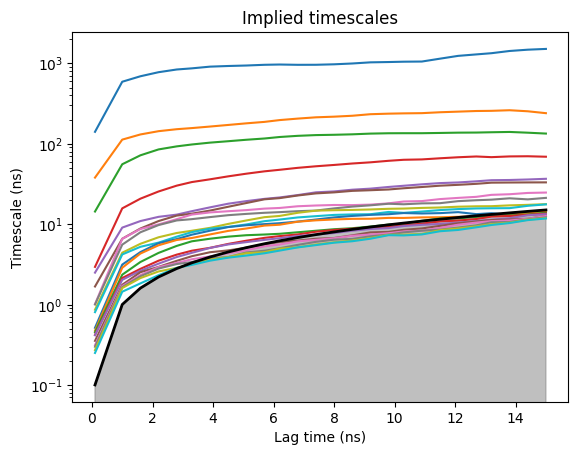
This is the ITS plot from the trypsin-benzamidine binding tutorial. Reading it:
Three slow processes stand clearly above the continuum: the slowest (blue, ~1500 ns), the second (orange, ~200 ns), and the third (green, ~130 ns).
Plateau region: every curve climbs sharply from lag ≈ 0 then flattens out by lag ≈ 4 ns. Pick the shortest plateau lag, which is ≈ 4 ns here.
Grey shaded region below: the line where
timescale = lag. Curves inside this region are kinetically meaningless (you can’t resolve a process faster than the lag you sampled it with).
With three slow processes clearly separated from the dense lower continuum, set markovModel(lag=4, macronum=4, units="ns") (3 slow processes → 4 metastable basins).
Drifting / non-plateauing curves#
If every curve keeps climbing linearly with lag, the underlying data is non-Markovian at this resolution: your microstate decomposition is too coarse, or your projection misses a slow degree of freedom. Re-cluster with more microstates, or change the features in your projection so they can capture the slowest degrees of freedom of the system.
Pathological gap#
A “gap” that disappears at higher lag, or that’s noisy across bootstraps, isn’t a real macrostate boundary. Bootstrap and look at the variance (see how-to).
Inverted timescales#
Timescales that decrease with lag almost always mean an over-clustering bug or a numerical artefact. Re-cluster with fewer microstates and re-fit.
Common variations#
Limit to the N slowest processes#
model.plotTimescales(maxlag=40, units="ns", nits=5)
By default plotTimescales() plots up to min(K-1, 20) slowest timescales (where K is the number of microstates). Pass nits=5 to keep only the 5 slowest curves. Useful when the continuum below them is noisy.
Bootstrapped ITS#
See How to bootstrap a model for error bars: re-run the ITS plot on each bootstrap and overlay; mean ± stdev across bootstraps tells you whether the plateau is sample-stable.
Compare lag times by direct call#
for lag in [5, 10, 20, 40]:
    model.markovModel(lag, macronum=4, units="ns")
    slowest_ns = model.msm.timescales()[0] * model.data.fstep
    print(f"lag={lag} ns -> slowest = {slowest_ns:.1f} ns")
model.msm.timescales() (deeptime API) returns the implied timescales in the same units as model.lag; htmd stores the lag in frames after the unit conversion from markovModel(..., units=...), so the values come back in frames. Multiply by model.data.fstep to get ns. Useful for quickly confirming the plateau choice without rerunning the full plot.
Gotchas#
Pick the shortest plateau-lag, not the highest one. Higher lag throws away both samples (fewer transition counts available at long lags) and kinetic resolution, for no Markovianity gain.
A clean plateau on a single un-bootstrapped fit can be deceptive. Always bootstrap and look at variance across replicates before settling on a lag.
“Number of slow processes” reads off as the number of curves visibly above the continuum. If your gap is fuzzy, your data probably doesn’t support that many macrostates; reduce
macronum.The ITS plot’s axis labels are always
"Lag time (ns)"/"Timescale (ns)", hardcoded regardless of theunits=argument you pass. Onlydata.fstepcontrols the absolute numeric scale; iffstepis wrong (or unset) the labels still claim “ns” but the numbers are in whatever unitfstepactually represents.
See also#
How to bootstrap a model for error bars: the variance check that validates plateau choice.
Villin folding MSM: real ITS plot reading in context.
htmd.model.Model.plotTimescales()andhtmd.model.Model.markovModel(): API references.