

Protein folding MSM: villin headpiece#
You will learn: how to take a set of unbiased MD trajectories of a small protein and build a Markov-state model that gives you the folded / unfolded macrostates, the folding timescale, and the folding rate.
Prerequisites:
HTMD installed.
wgetavailable on$PATH(or substitute your favourite downloader).Patience for a one-time ~1 GB dataset download.
The system#
The villin headpiece is a 35-residue protein with a single hydrophobic core, one of the smallest naturally-occurring autonomously folding domains. We use a set of unbiased explicit-solvent trajectories run at 360 K (above the melting point, so both folded and unfolded states are populated). Total aggregate ≈ 107 µs across 2137 short trajectories.
The flow#
The MSM pipeline you’ll follow:
Download + index the filtered trajectories with
simlist().Project the geometry onto a low-dimensional distance space with
MetricSelfDistance.Reduce dimensions with TICA to find the slow collective coordinates.
Cluster the TICA space into ~1000 microstates.
Build a Markov model: choose a lag time from the implied-timescales plot, then lump microstates into macrostates with PCCA.
Read kinetics: equilibrium populations, free-energy surface, mean first-passage times.
Setup#
import os
from glob import glob
from pathlib import Path
from htmd.ui import (
    simlist, simmerge,
    Metric, MetricSelfDistance,
    TICA, Model, Kinetics,
)
from sklearn.cluster import MiniBatchKMeans
Please cite HTMD: Doerr et al.(2016)JCTC,12,1845. https://dx.doi.org/10.1021/acs.jctc.6b00049
HTMD Documentation at: https://software.acellera.com/htmd/

You are on the latest HTMD version (2.8.5.dev17+gf26491d44.d20260602).
2026-06-02 18:43:57,627 - rdkit - INFO - Enabling RDKit 2026.03.2 jupyter extensions
Step 1: Build a simulation list#
The filtered trajectories (already stripped of waters and ions, aligned for analysis) ship as a zip on Figshare (HTMD tutorial data, DOI 10.6084/m9.figshare.32541291). Download protein_folding_datasets.zip and extract it once (~2.5 GB). The tutorial reads the absolute path from the HTMD_TUTORIAL_DATASETS environment variable so the same notebook works regardless of where you extracted to.
The dataset is organised as several “epochs” (independent adaptive-sampling rounds). simlist() builds one list per epoch (duplicate folder basenames within a single call would raise), and simmerge() stitches the per-epoch lists into one combined list, renumbering the simid indices to be sequential across the merged whole:
DATASETS = Path(os.environ["HTMD_TUTORIAL_DATASETS"]) / "protein_folding_datasets"
topology = str(DATASETS / "1" / "filtered")  # any epoch works; all share the same topology
sims = []
for epoch in sorted(DATASETS.glob("*/")):
    trajs = glob(os.path.join(epoch, "filtered", "*", ""))
    sims = simmerge(sims, simlist(trajs, topology))
len(sims)
2137
A Sim is the unit of analysis: trajectory frames + the matching topology / structure file (any moleculekit-supported topology format works: PDB, PSF, prmtop, …).
Step 2: Project geometry to Cα distances#
Folding is encoded in the network of Cα-Cα contacts: in the unfolded state the helices are apart, in the folded state they pack against each other. MetricSelfDistance computes the upper-triangular distance matrix between every Cα pair, frame by frame. metric="contacts" thresholds those distances into 0/1 contacts (1 if below the threshold, 0 otherwise; default threshold=8 Å). Contact features are cheaper and more robust than raw distances for MSMs.
metr = Metric(sims)
metr.set(MetricSelfDistance("protein and name CA", metric="contacts", periodic="chains"))
data = metr.project()
data.fstep = 0.1  # ns per frame; tells downstream code the time axis
htmd.projections.metric - INFO - Frame step 0.1ns was read from the trajectories. If it looks wrong, redefine it by manually setting the MetricData.fstep property.
data is a MetricData object: per-trajectory projected coordinates plus the metric metadata.
data.plotTrajSizes()
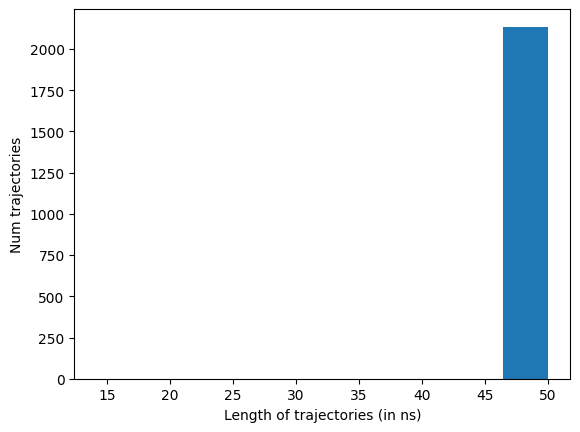
Drop any trajectories whose length isn’t the statistical mode (the most common frame count). By default dropTraj() removes anything off that mode, both crashed (too short) and over-run (too long), so the rest of the pipeline sees a uniform-length set:
data.dropTraj()
htmd.metricdata - INFO - Dropped 7 trajectories from 2137 resulting in 2130
array([ 168, 472, 709, 1507, 1601, 2100, 2111])
Step 3: TICA, to find the slow coordinates#
TICA (Time-lagged Independent Component Analysis) re-projects the high-dimensional contact space onto the directions of slowest decorrelation. For an MSM, those slow directions are exactly what you want to discretise.
tica = TICA(data, 2, units="ns")        # lag time for the TICA fit
dataTica = tica.project(3)              # keep the 3 slowest TIC coordinates
The lag time you pick here (2 ns) should be a few times the fastest non-trivial relaxation; for villin folding 2 ns is plenty.
Step 4: Cluster the TICA space#
Discretise the continuous TICA space into ~1000 microstates with mini-batch k-means. Bootstrap the data first (sample 80% of trajs): re-running with different bootstrap draws gives you deviations / error bars on the timescales and is the standard check that the model is sample-stable:
dataBoot = dataTica.bootstrap(0.8)
dataBoot.cluster(MiniBatchKMeans(n_clusters=1000))
Step 5: Build the MSM#
model = Model(dataBoot)
model.plotTimescales(maxlag=40, units="ns")
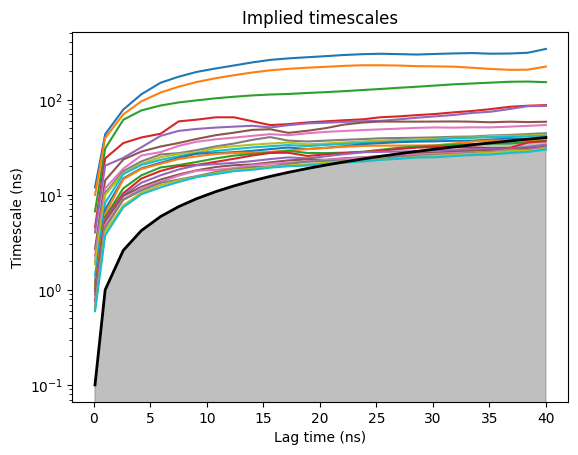
The implied-timescales (ITS) plot tells you when the model becomes Markovian: pick the shortest lag time at which the top timescales have plateaued. For villin folding that’s ~25 ns; the slow folding timescale is clearly separated from the bulk continuum.
model.markovModel(25, 4, units="ns")
htmd.model - INFO - 100.0% of the data was used
htmd.model - INFO - Number of trajectories that visited each macrostate:
htmd.model - INFO - [ 116  479   74 1655]
25 is the MSM lag time in ns; 4 is the number of macrostates PCCA lumps the microstates into. We pick 4 because the ITS plot shows the top 3 timescales clearly separated from the rest of the spectrum; 3 slow processes partition the microstate space into 3 + 1 = 4 metastable basins. The result captures the folded basin + a couple of unfolded sub-states + the transition region.
Step 6: Equilibrium populations and FES#
model.eqDistribution()
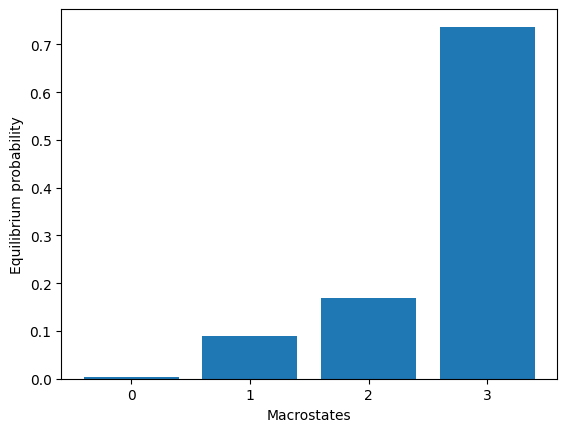
array([0.00353847, 0.09011645, 0.16917454, 0.73717054])
model.plotFES(0, 1, temperature=360)
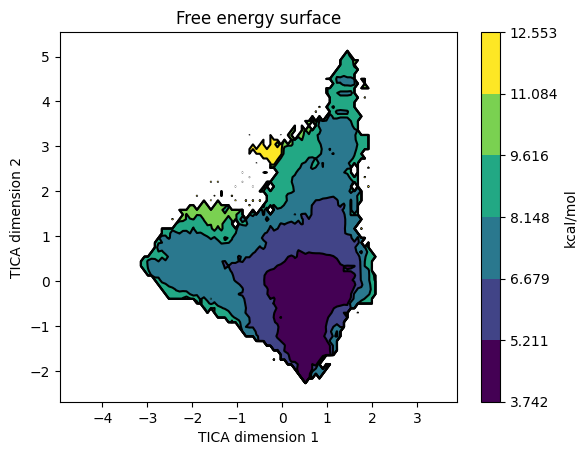
The FES on TIC1 / TIC2 shows the macrostate basins. Overlay the state assignments:
model.plotFES(0, 1, temperature=360, states=True)
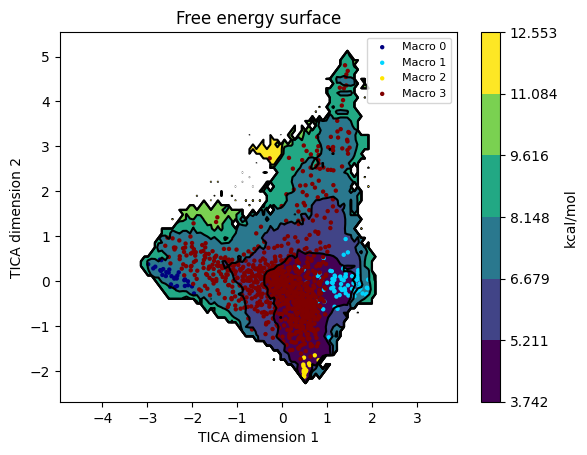
To eyeball the macrostates as structures, run model.viewStates(protein=True) from an interactive session; it launches VMD with one representative frame per macrostate. (Omitted here because it needs a display.)
Step 7: Kinetics#
kin = Kinetics(model, temperature=360)
r = kin.getRates()
print(r)
mfpton = 2.09E+03 (ns)
mfptoff = 2.35E+02 (ns)
kon = 4.79E+05 (1/M 1/s)
koff = 4.25E+06 (1/s)
koff/kon = 8.87E+00 (M)
kdeq = 4.36E+00 (M)
g0eq = 1.05 (kcal/M)
htmd.kinetics - INFO - Detecting source state...
htmd.kinetics - INFO - Guessing the source state as the state with minimum contacts.
htmd.kinetics - INFO - Source macro = 3
htmd.kinetics - INFO - Detecting sink state...
htmd.kinetics - INFO - Sink macro = 2
htmd.kinetics - INFO - Calculating rates between source: [np.int64(3)] and sink: [np.int64(2)] states.
Kinetics reads the macrostate model and computes mean-first-passage times and rates. getRates() returns a single Rates object for one auto-detected source → sink pair (folded → unfolded by default). To inspect all pairs, pass source= / sink= explicitly per call, or use kin.plotRates() (below) which iterates internally.
kin.plotRates()
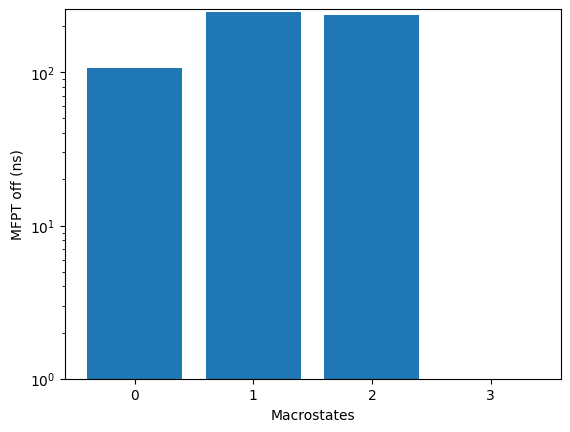
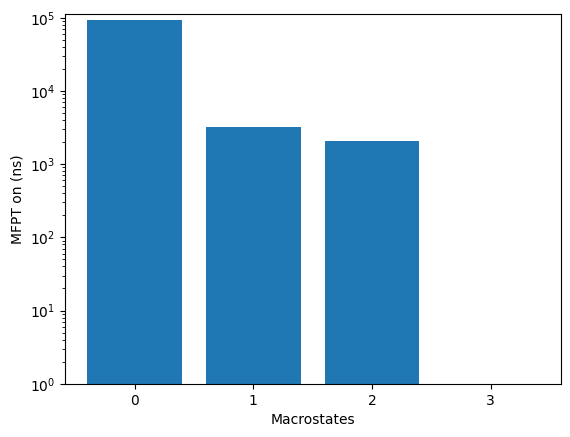
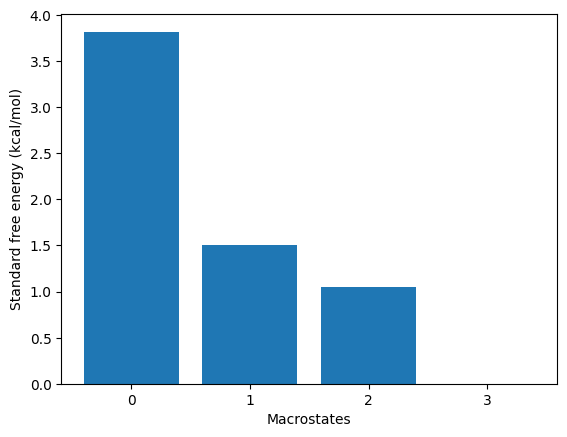
kin.plotFluxPathways()
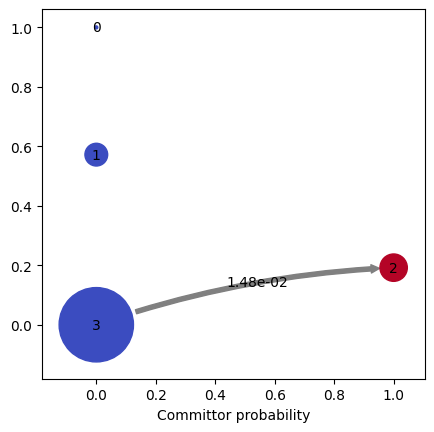
Path flux		%path	%of total	path
0.014825165238110399	100.0%	100.0%		[3 2]
Flux pathways visualise the dominant transition routes in TPT (transition-path theory) form, showing which intermediates the protein actually visits on its way from unfolded to folded.
Parameters that matter#
Knob |
Effect |
|---|---|
|
Contact features are coarser but more robust than raw distances: the binary thresholding makes clusters insensitive to small Cα-Cα fluctuations within a folded basin. |
|
Set a few times the fastest non-trivial relaxation. Too small → noise; too large → loses fast slow modes. |
|
Number of TIC coordinates kept. 3-5 is typical; check the eigenvalue spectrum to decide. |
|
More clusters = finer microstate resolution but slower. 500-2000 is the usual range. |
|
Read off the ITS plot: the shortest lag at which slow timescales plateau. |
|
PCCA macrostates. Look at the timescale gaps in the ITS plot to pick the number. |
Gotchas#
ITS plateau, not minimum. Pick the lag where slow timescales first level off, not where they’re highest. Too-long lags throw away kinetic resolution for no gain.
bootstrap(0.8)lets you get deviations / error bars and see whether the model is sample-stable. Re-run with several bootstrap draws and compare; if different bootstraps give wildly different ITS / states, your dataset is undersampled.Macrostate count is a judgement call. Look at the timescale gap pattern: if you see a clear gap after k slow timescales, take k+1 macrostates.
See also#
MSM workflow explanation: the conceptual pipeline behind these calls.
Ligand binding MSM: the same pipeline for a binding system (uses
MetricDistancebetween protein and ligand instead ofMetricSelfDistanceon the protein).Adaptive sampling: how to generate the trajectory set that feeds this analysis.